반응형
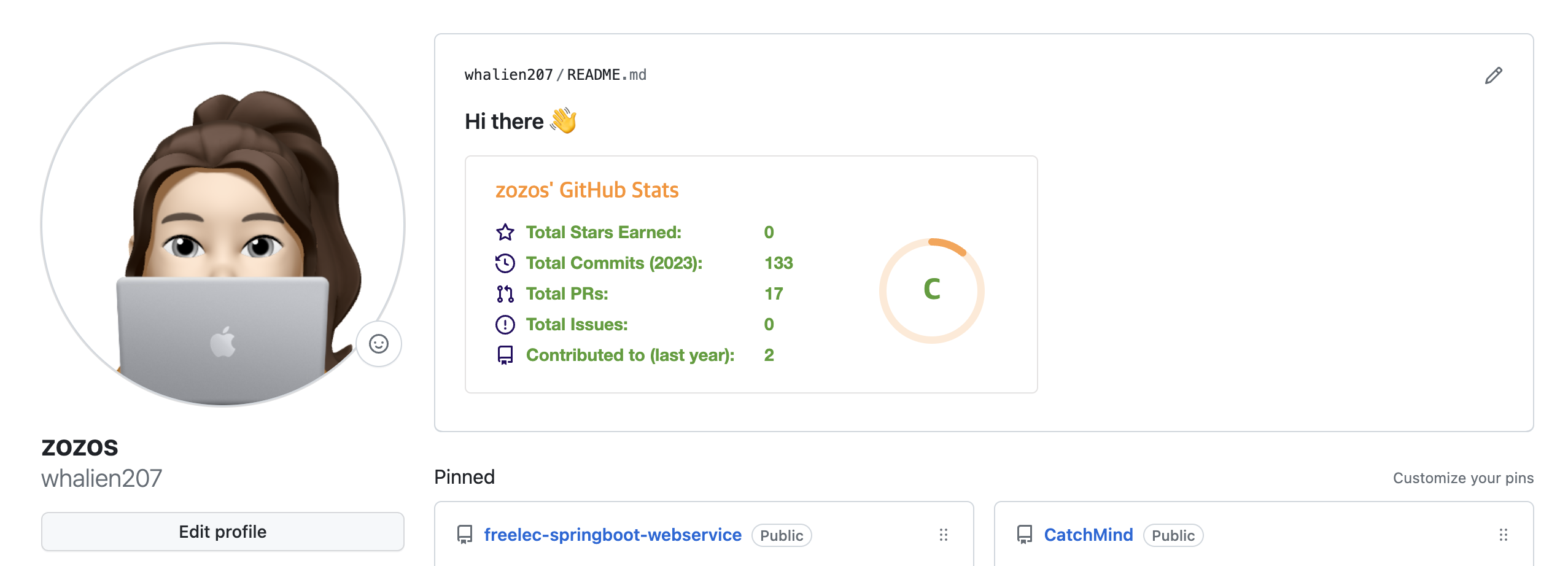
GitHub에 메인 화면을 readme를 사용하여 꾸밀 수 있다는 것을 알게되었다.
다양한 것들이 많지만 사람들이 가장 많이 해놓는 GitHub Stats만 넣어보았다.
내 등급이 A이상이 되는 그날까지~
git에서 내 계정명과 동일한 repository 생성 & readme 파일 생성
일단 Git에서 내 계정명과 동일한 repository를 생성한다. add Readme file을 체크하여!
나는 이미 동일한 repository가 있기때문에 already exists라고 뜬다.

생성하면 readme.md파일만 들어있는 repository가 생성되고 Hi there만 들어있을 것이다.

GitHub Stats 추가
readme.md파일을 열어 아래 코드를 추가해주고 [사용자이름]에 본인 계정을 넣어주고, [원하는테마]에 원하는 테마를 넣어준다.

테마는 아래 링크에서 확인할 수 있다.
https://github.com/anuraghazra/github-readme-stats/blob/master/themes/README.md
반응형
'Dev' 카테고리의 다른 글
| Hello Controller 테스트 코드 작성하기 (0) | 2023.09.12 |
|---|---|
| 스프링 부트에서 테스트 코드를 작성하자 (1) | 2023.09.07 |
| 인텔리제이에서 깃과 깃허브 사용하기 (0) | 2023.07.20 |
| Gradle 프로젝트를 Spring boot 프로젝트로 변경하기 (0) | 2023.07.18 |
| IntelliJ Community에서 프로젝트 생성하기 - Gradle기반의 java project 생성 (0) | 2023.07.16 |


