서브쿼리
- select 문장 절에 내장된 select 문장이다.
- 단일 행 서브쿼리에서는 연산자(>=, <. <>, <=)를 활용해서 값을 산출할 수 있지만, 다중 행 서브쿼리에서는 IN, ANY, ALL과 같은 키워드들을 사용해주어야 한다.
단일 행 서브쿼리
1️⃣ 단일 행 서브쿼리 예시1
-- nancy의 급여
select  salary from employees where first_name = 'Nancy';
-- nancy보다 급여를 많이 받는 사람.
select * from employees where salary >= 12008;
낸시의 월급인 12008원을 직접입력할 수도 있지만 아래와 같이 서브쿼리를 활용하여 똑같은 결과를 산출할 수 있다.
-- 아래는 두개의 짬뽕 (서브쿼리 사용하여 낸시의 급여(12008)보다 급여를 많이 받는 사람 출력
select * from employees where salary >= (select  salary from employees where first_name = 'Nancy');
2️⃣ 단일 행 서브쿼리 예시2
-- employee_id 가 104번인 사람과 job_id가 동일한 사람을 검색하는 문장
select job_id from employees where employee_id = 104;

select * from employees where job_id = (select job_id from employees where employee_id = 104);
❓ 아래 처럼 여러개의 결과값이 나오는 것을 서브쿼리로 활용하고 싶다면 다중 행 서브쿼리를 활용해 주어야 한다.

-- 서브쿼리의 결과가 여러개 라면, 단일행 연산자를 사용할 수 없다.
-- 이런경우 다중행 서브쿼리를 연산자를 이용해서 처리해야한다.
select employee_id from employees where job_id = 'IT_PROG';
-- 여러개의 결과값이 나오는 select 구문을 단일 행 서브쿼리에 활용하고 있기 때문에 에러가 난다
select * from employees where employee_id > (select employee_id from employees where job_id = 'IT_PROG');
다중 행 서브쿼리
아래와 같이 David의 salary를 활용해보자 (David를 first_name으로 가지는 사람이 3명이므로 결과값이 3개가 나온다)

select salary from employees where first_name = 'David';
1️⃣ IN 활용 ❗가장많이 쓰인다
-- 정확히 일치하는 IN
select *
from  employees
where salary IN (select  salary from employees where first_name = 'David');
2️⃣ ANY 활용
-- ANY - ()의 결과값 중에 최소값보다 큰 or 최대값 보다 작은 (4800, 6800, 9500)
select *
from  employees
where salary > ANY (select  salary from employees where first_name = 'David'); -- 4800(제일 작은 값) 보다 큰

select *
from  employees
where salary < ANY (select  salary from employees where first_name = 'David'); -- 9500(제일 큰 값) 보다 작은
3️⃣ ALL 활용
-- ALL - 최대값 보다 큰 or 최소값 보다 작은
select *
from  employees
where salary > ALL (select  salary from employees where first_name = 'David'); -- 9500(제일 큰 값) 보다 큰

select *
from  employees
where salary < ALL (select salary from employees where first_name = 'David'); -- 4800(제일 작은 값) 보다 작은
🔸 ANY와 ALL을 잘 구분하자

🔸 실습
-- first_name - STEVEN의 급여보다 작은사람
select salary from employees where lower(first_name) = 'steven';
select * from employees where salary < ANY (select salary from employees where lower(first_name) = 'steven');
스칼라(Scalar) 서브쿼리
- 특정 Table에 하나의 컬럼을 가지고 올때 사용하면 좋다.
- select 구문에 서브쿼리가 오는 것이다.
- Left outer Join이랑 같은 결과를 볼 수 있다.
- where 절에 join에서 on에 들어가는 것과 같이 어떤 데이터를 중심으로 묶어줄지 키를 적어준다.
-- join으로 department name 가져오기
select first_name, department_name from employees e
left outer join departments d on e.department_id = d.department_id
order by first_name asc;

-- scalar 서브 쿼리
select first_name,
    (select department_name from departments d where e.department_id = d.department_id)
from employees e
order by first_name asc;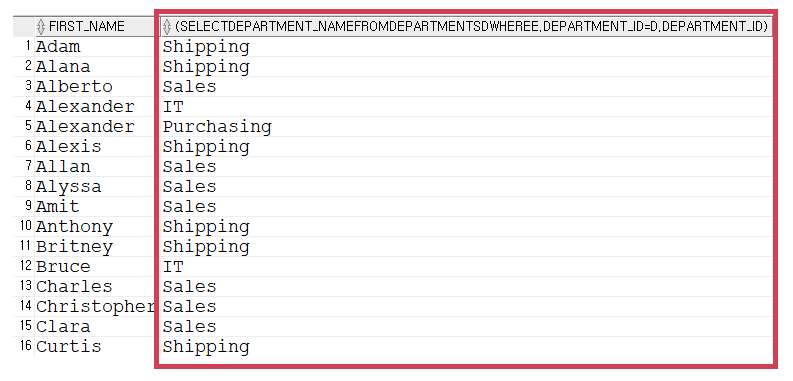
❗ 효율적인 면을 생각해서 사용하기
-- scalar 서브쿼리를 여러개 사용해 줄 수도 있지만 같은 table에서
--두개의 scalar 서브쿼리를 사용하는 것보다는 그냥 join을 사용하는 것이 좋다.
select first_name,
    (select department_name from departments d where e.department_id = d.department_id),
    (select location_id from departments d where e.department_id = d.department_id)
from employees e
order by first_name asc;
-- 각 부서의 매니저 장의 이름
-- left join
select d.*, e.first_name from departments d
left outer join employees e
on d.manager_id = e.employee_id
order by d.manager_id;

--스칼라
select d.* ,(select first_name from employees e where d.manager_id = e.employee_id)
from departments d order by d.manager_id;
--left join
select e1.*, d.department_name as 직원의부서, e2.first_name as 매니저이름
from employees e1
left outer join employees e2 on e1.manager_id = e2.employee_id
left outer join departments d on e1.department_id = d.department_id;

-- 스칼라
select * from departments;
select e1.*,
    (select d.department_name from departments d where e1.department_id = d.department_id) as 직원의부서,
    (select e2.first_name from employees e2 where e1.manager_id = e2.employee_id) as 매니저이름
from employees e1;
-- 부서별 사원수
select department_id, count(*) from employees group by department_id order by count(*);

-- 스칼라
select department_id from employees;
select d.*, (select count(*) from employees e where e.department_id = d.department_id) as count from departments d order by count;
인라인 뷰
- from(안에 select구문을 넣어서 하나의 table 또는 뷰 처럼 사용가능하다)
- 인라인 뷰는 중첩 사용이 가능하다.
1️⃣ 인라인 뷰 사용 예시
-- 인라인뷰
select * from employees;
select * from (select * from employees);
2️⃣ 인라인 뷰와 rownum을 사용하여 앞에 순서대로 번호 붙여주기 (순위매기기)
-- order by 절로 정렬이 되면서 앞에 번호(rownum)이 뒤죽박죽이 된다.
select rownum, first_name, job_id, salary from employees order by salary;
salary 순으로 정렬을 하고 rownum을 붙여준다면 순서가 뒤죽박죽이된다.
인라인뷰를 사용하여 from절안에 salary로 정렬하여 뽑고 싶은 데이터를 뽑은 후 바깥의 select절에 rownum을 붙여서 순위를 매겨준다.
-- 해결방법
select rownum, a.*
from (select first_name, job_id, salary from employees order by salary) a
where rownum <= 10; -- 낮은 급여 순위 10위까지 순위를 구하는 것.
3️⃣ rownum으로 매긴 순위의 원하는 범위만 뽑기
-- rownum은 1번째 행부터 조회할 수 있기 때문에 결과 값이 안나온다. (사이 값으로 카운트 불가능)
select rownum, a.*
from (select first_name, job_id, salary from employees order by salary) a
where rownum > 10 and rownum <= 20;
rownum은 1번째 행부터 조회할 수 있기 때문에 10위부터 20위 사이는 구할 수 없다.
아래와 같이 rownum을 붙여서 조회한 select문을 한번더 인라인 뷰로 감싸 rownum에 대한 조건을 줄 수 있다.

-- 해결방법 인라인뷰를 중첩으로 사용하면 가능하다.
-- 게시판 페이징에 이용가능하므로 알아야 하는 쿼리문이다...

--1단계
select rownum as rn, a.*
from(select * from employees order by salary desc) a;

--2단계
select *
from (select rownum as rn, a.*
from(select * from employees order by salary desc) a
)
where rn  > 10 and rn <=20;
4️⃣ 인라인 뷰 응용 (join 테이블과 인라인뷰 / 스칼라 쿼리와 인라인뷰)
-- 인라인 뷰 응용 (join 테이블의 위치로 인라인 뷰 삽입가능 or 스칼라 쿼리와 혼합해서 사용가능)

-- department 테이블에서 manager_id가 null이 아닌 데이터를 employee에 조인
select * from departments where manager_id is not null;

select * from employees e
left outer join (select *
                from departments
                where manager_id is not null) d
on e.department_id = d.department_id;

-- salary가 10000이상인 직원의 정보 전부, 부서면, 부서의 주소, job_title을 출력, salary 기준으로 내림차순

select e.*, d.department_name, l.street_address, j.job_title
from employees e
left outer join departments d on e.department_id = d.department_id
left outer join locations l on d.location_id = l.location_id
left outer join jobs j on e.job_id = j.job_id
where salary >= 10000;

-- 인라인뷰에 들어갈 구문
select * from employees e
left outer join departments d
on e.department_id = d.department_id
where salary >= 10000;

select * from (select * from employees e
left outer join departments d
on e.department_id = d.department_id
where salary >= 10000) a
order by salary desc;

-- 스칼라 쿼리 추가
select a.*,
        (select street_address from locations l where l.location_id=a.location_id) as street_address,
        (select  job_title from jobs j where j.job_id = a.job_id) as job_title
from (select * from employees e
left outer join departments d
on e.department_id = d.department_id
where salary >= 10000) a;
연습문제
--문제 1.
---EMPLOYEES 테이블에서 모든 사원들의 평균급여보다 높은 사원들을 데이터를 출력 하세요 ( AVG(컬럼) 사용)
select avg(salary) from employees; -- 6461원
select * from employees where salary >= (select avg(salary) from employees) order by salary;

---EMPLOYEES 테이블에서 모든 사원들의 평균급여보다 높은 사원들을 수를 출력하세요
select count(*) from employees where salary >= (select avg(salary) from employees);

---EMPLOYEES 테이블에서 job_id가 IT_PFOG인 사원들의 평균급여보다 높은 사원들을 데이터를 출력하세요
select avg(salary) from employees where job_id = 'IT_PROG'; --5760원
select * from employees where salary >= (select avg(salary) from employees where job_id = 'IT_PROG') order by salary;

--문제 2.
---DEPARTMENTS테이블에서 manager_id가 100인 사람의 department_id와
--EMPLOYEES테이블에서 department_id가 일치하는 모든 사원의 정보를 검색하세요.
select * from departments where manager_id = 100; -- department_id = 90
select * from employees where department_id = (select department_id from departments where manager_id = 100);

--문제 3.
---EMPLOYEES테이블에서 “Pat”의 manager_id보다 높은 manager_id를 갖는 모든 사원의 데이터를 출력하세요

select * from employees where first_name = 'Pat'; -- pat의 manager_id 201
select * from employees where manager_id >= (select manager_id from employees where first_name = 'Pat');

---EMPLOYEES테이블에서 “James”(2명)들의 manager_id와 갖는 모든 사원의 데이터를 출력하세요.
select * from employees where first_name = 'James'; -- 120과 121의 manager_id를 가지고 있음.
select * from employees where manager_id IN (select manager_id from employees where first_name = 'James');

--문제 4.
---EMPLOYEES테이블 에서 first_name기준으로 내림차순 정렬하고, 41~50번째 데이터의 행 번호, 이름을 출력하세요
select rownum, e.* from employees e order by first_name desc;

select *
from (select rownum rn, a.*
from (select * from employees order by first_name desc) a)
where rn between 41 and 50
order by rn asc;


--문제 5.
---EMPLOYEES테이블에서 hire_date기준으로 오름차순 정렬하고, 31~40번째 데이터의 행 번호, 사원id, 이름, 번호,
--입사일을 출력하세요.
select rownum as rn, e.* from employees e order by hire_date asc;

select rn, employee_id, concat(first_name||' ', last_name), hire_date
from (select rownum as rn, e.* from employees e order by hire_date asc)
where rn between 31 and 40 order by rn;

select *
from(select rownum rn, employee_id, concat(first_name||' ', last_name), hire_date
from (select * from employees order by hire_date asc))
where rn between 31 and 40 order by rn;

--문제 6.
--employees테이블 departments테이블을 left 조인하세요
--조건) 직원아이디, 이름(성, 이름), 부서아이디, 부서명 만 출력합니다.
--조건) 직원아이디 기준 오름차순 정렬
select e.employee_id, concat(e.first_name||' ', e.last_name) as name, d.department_id, d.department_name
from employees e
left outer join departments d
on e.department_id = d.department_id
order by employee_id asc;

--문제 7.
--문제 6의 결과를 (스칼라 쿼리)로 동일하게 조회하세요
select e.employee_id, concat(e.first_name||' ', e.last_name), e.department_id,
    (select department_name from departments d where e.department_id = d.department_id)
from employees e
order by employee_id asc;

--문제 8.
--departments테이블 locations테이블을 left 조인하세요
--조건) 부서아이디, 부서이름, 매니저아이디, 로케이션아이디, 스트릿_어드레스, 포스트 코드, 시티 만 출력합니다
--조건) 부서아이디 기준 오름차순 정렬
select * from departments;
select * from locations;


select d.department_id, d.department_name, l.location_id, l.street_address, l.postal_code, l.city
from departments d
left outer join locations l
on d.location_id = l.location_id
order by d.department_id asc;

--문제 9.
--문제 8의 결과를 (스칼라 쿼리)로 동일하게 조회하세요 (효율적이진 않다)

select d.department_id, d.department_name, d.location_id,
        (select l.street_address from locations l where d.location_id = l.location_id) as street_address,
        (select l.postal_code from locations l where d.location_id = l.location_id) as postal_code,
        (select l.city from locations l where d.location_id = l.location_id) as city
from departments d
order by d.department_id asc;

--문제 10.
--locations테이블 countries 테이블을 left 조인하세요
--조건) 로케이션아이디, 주소, 시티, country_id, country_name 만 출력합니다
--조건) country_name기준 오름차순 정렬

select l.location_id, l.street_address, c.country_id, c.country_name
from locations l
left outer join countries c
on l.country_id = c.country_id
order by c.country_name asc;

--문제 11.
--문제 10의 결과를 (스칼라 쿼리)로 동일하게 조회하세요
select l.location_id, l.street_address, l.country_id,
        (select c.country_name from countries c where l.country_id = c.country_id) as country_name
from locations l
order by country_name asc;


--문제 12.
--employees테이블, departments테이블을 left조인 hire_date를 오름차순 기준으로 1-10번째 데이터만 출력합니다
--조건) rownum을 적용하여 번호, 직원아이디, 이름, 전화번호, 입사일, 부서아이디, 부서이름 을 출력합니다.
--조건) hire_date를 기준으로 오름차순 정렬 되어야 합니다. rownum이 틀어지면 안됩니다.

select e.employee_id, concat(e.first_name||' ', e.last_name), e.phone_number,  e.hire_date,
        d.department_id, d.department_name
from employees e
left outer join departments d
on e.department_id = d.department_id
order by hire_date asc;

select *
from( select rownum rn, a.*
from( select e.employee_id, concat(e.first_name||' ', e.last_name), e.phone_number, e.hire_date,
        d.department_id, d.department_name
        from employees e
        left outer join departments d
        on e.department_id = d.department_id
        order by hire_date asc) a)
where rn <= 10;


--문제 13.
----EMPLOYEES 과 DEPARTMENTS 테이블에서 JOB_ID가 SA_MAN 사원의 정보의 LAST_NAME, JOB_ID,
-- DEPARTMENT_ID,DEPARTMENT_NAME을 출력하세요

select e.last_name, e.job_id, e.department_id,
        (select d.department_name from departments d where d.department_id = e.department_id)
from employees e where job_id = 'SA_MAN';


--문제 14
----DEPARTMENT테이블에서 각 부서의 ID, NAME, MANAGER_ID와 부서에 속한 인원수를 출력하세요.
----인원수 기준 내림차순 정렬하세요.
----사람이 없는 부서는 출력하지 뽑지 않습니다


select d.department_id, d.department_name, d.manager_id,
        (select count(*) from employee where )
from departments d;


--1
select d.department_id, d.department_name, d.manager_id,
        (select count(*) from employees e where d.department_id = e.department_id) as count
from departments d
where d.manager_id is not null
order by count desc;

--2
select a.*
from(select d.department_id, d.department_name, d.manager_id,
          (select count(*) from employees e where d.department_id = e.department_id) as count
    from departments d
    order by count desc) a
where a.count > 0;


--문제 15
----부서에 대한 정보 전부와, 주소, 우편번호, 부서별 평균 연봉을 구해서 출력하세요
----부서별 평균이 없으면 0으로 출력하세요
--select * from employees;
--select * from departments;
--select * from locations;

--1
select d.*,
        (select l.street_address from locations l where l.location_id = d.location_id) as street_address,
        (select l.postal_code from locations l where l.location_id = d.location_id) as postal_code,
        (select decode(avg(e.salary), null, 0, avg(e.salary)) from employees e where e.department_id = d.department_id) as salary_avg
from departments d;

--2
select d.*, l.street_address, l.postal_code,
    (select decode(avg(e.salary), null, 0, avg(e.salary)) from employees e where e.department_id = d.department_id) as salary_avg
from departments d
left outer join locations l
on d.location_id = l.location_id
order by d.department_id;

--문제 16
---문제 15결과에 대해 DEPARTMENT_ID기준으로 내림차순 정렬해서 ROWNUM을 붙여 1-10데이터 까지만
--출력하세요

select *
from( select rownum rn, a.*
    from( select d.*,
            (select l.street_address from locations l where l.location_id = d.location_id) as street_address,
            (select l.postal_code from locations l where l.location_id = d.location_id) as postal_code,
            (select decode(avg(e.salary), null, 0, avg(e.salary)) from employees e where e.department_id = d.department_id) as salary_avg
        from departments d
        order by d.department_id desc
    )a
)
where rn <= 10;

select *
from( select rownum rn, a.*
    from( select d.*, l.street_address, l.postal_code,
        (select decode(avg(e.salary), null, 0, avg(e.salary)) from employees e where e.department_id = d.department_id) as salary_avg
        from departments d
        left outer join locations l
        on d.location_id = l.location_id
        order by d.department_id
    )a
)
where rn <= 10;
'국비지원 > DataBase' 카테고리의 다른 글
| [DB] 9. 트랜잭션(Transaction) & 테이블 생성(CREATE TABLE) (0) | 2022.11.15 |
|---|---|
| [DB] 8. DML (Data Manipulation Language) (0) | 2022.11.15 |
| [DB] 6. JOIN (ANSI JOIN) / Inner Join, Outer Join, Cross Join, Self Join (0) | 2022.11.10 |
| [DB] 5. 그룹 함수 / GROUP BY / HAVING & ROLLUP/CUBE/GROUPING (0) | 2022.11.10 |
| [DB] 4. 함수 - 숫자 함수 / 형 변환 함수 / 집합 연산자 / 분석 함수 (0) | 2022.11.09 |


