그룹함수
여러 행에 대해서 하나의 결과를 뽑아주는 함수로 5가지가 있다.

select  AVG(salary), MAX(salary), MIN(salary), SUM(salary), COUNT(salary) from employees;
select max(hire_date), min(hire_date) from employees; -- 날짜에도 그룹함수가 적용가능하다.
❗ 주의할점: 그룹함수가 일반 컬럼과 동시에 출력 불가능.
select employee_id, sum(salary) from employees;
🔸 count 함수

select count(*) from employees; -- 총 행 데이터의 수
select count(commission_pct), count(manager_id) from employees; -- null이 아닌 행의 수
GROUP BY

-- 부서별 급여 평균
select department_id, avg(salary) from employees group by department_id;
❗ 주의할 점 : group절에 묶이지 않은 컬럼은 select 절에 사용불가. (데이터베이스별로 다름)
select job_id, department_id, avg(salary) from employees group by department_id;-- 2개 이상의 그룹명
select department_id, job_id from employees group by department_id, job_id order by department_id desc;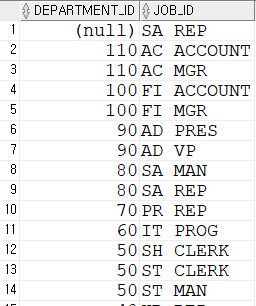
-- count(*) 그룹별 수 count(*) over() 전체 행수
select department_id, job_id, sum(salary), count(*), count(*) over()
from employees group by department_id, job_id order by department_id desc;

select  department_id, job_id, count(*) over() from employees;
❗ 주의할 점 : where절에 그룹함수 사용이 안된다.
select department_id from employees where sum(salary) >= 5000 group by department_id;
HAVING
- Group by로 묶은 그룹에 Having으로 조건을 줘서 출력할 수 있다.
- group by는 having과 set

select department_id, sum(salary)
from employees
group by department_id
having sum(salary) > 100000;

select job_id, count(*)
from employees
group by job_id
having count(*) >= 20;
➰ 부서아이디가 50이상인 것들을 그룹화시키고, 그룹평균 중 5000이상만 조회, 정렬 평균 내림차순
select * from employees;
select department_id, trunc(avg(salary)) as 평균
from employees
group by department_id
having department_id >= 50 and avg(salary) >= 5000
order by avg(salary) desc;

-- 강사님 풀이
select * from employees;
select department_id, trunc(avg(salary)) as 평균
from employees
where department_id >= 50
group by department_id
having avg(salary) >= 5000
order by avg(salary) desc;
➰직무 SA가 포함된 데이터의 그룹별 사원수, 그룹별 급여합
select * from employees where job_id like 'SA%';
select job_id, count(*), sum(salary) from employees where job_id like 'SA%' group by job_id;
select * from employees;
ROLLUP/CUBE/GROUPING
1️⃣ ROLLUP
- rollup 주그룹의 count를 출력해주는 역할을 한다.

-- 그룹핑이 1개 > 총계출력
select department_id, sum(salary)
from employees
group by rollup(department_id)
order by department_id;

-- 그룹핑 2개
select department_id, job_id, avg(salary), count(salary)
from employees
group by rollup(department_id, job_id)
order by department_id;
2️⃣ CUBE
- 주그룹의 count와 서브 그룹의 count 또한 출력해주는 역할을 한다.
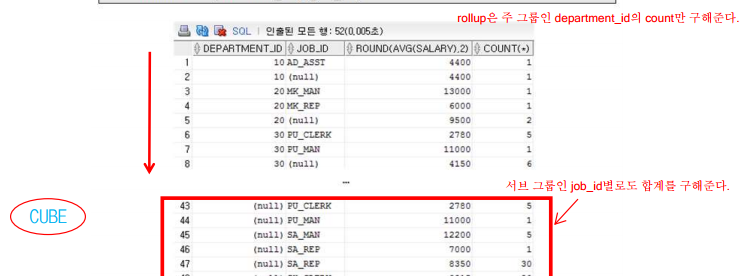
-- cube 주그룹과 서브그룹의 count
select department_id, job_id, avg(salary), count(salary)
from employees
group by cube(department_id, job_id)
order by department_id;
3️⃣ GROUPING
gorup by 에 의해서 산출된 결과에는 0을, rollup이나 cube에 의해 산출된 결과에는 1을 반환해준다.
select department_id, job_id, avg(salary), count(salary), grouping(department_id), grouping(job_id)
from employees
group by rollup(department_id, job_id)
order by department_id;

select department_id, decode( grouping(job_id), 1, '소계', job_id),
job_id, avg(salary), count(salary), grouping(department_id)
from employees
group by rollup(department_id, job_id)
order by department_id;
🔸 이해 파트
select department_id, sum(salary), grouping(department_id)
from employees
group by rollup(department_id);
만약 위처럼 department_id를 rollup을 시켜서 총계를 표시하도록 하였다. 실행하면 아래와 같은 결과가 나오는데 Gouping 라인에 나오는 값들은 0은 group by 1은 rollup으로 나온 결과를 의미한다. 즉 제일 밑줄 1로 표시된 줄은 sum(salary)의 합계를 보여주고 있다.

select decode(grouping(department_id),1,'합계', department_id), sum(salary), grouping(department_id)
from employees
group by rollup(department_id);
department_id를 보여주는 부분을 grouping을 시키고 decode로 조건을 주면 grouping 결과가 1이면 rollup으로 나온 결과라는 것이니까 합계라고 보여주고 아니라면 그냥 department_id를 보여주도록하면 마지막줄인 합계부분만 NULL이 아니라 합계로 표시되게 된다.

연습문제
--문제 1.
--사원 테이블에서 JOB_ID별 사원 수를 구하세요.
select job_id, count(*) as 사원수 from employees group by job_id;

--사원 테이블에서 JOB_ID별 월급의 평균을 구하세요. 월급의 평균 순으로 내림차순 정렬하세요
select job_id, avg(salary) from employees group by job_id order by avg(salary) desc;

--문제 2.
--사원 테이블에서 입사 년도 별 사원 수를 구하세요.
select substr(hire_date,0,2) from employees;

select concat(concat('20',substr(hire_date,0,2)),'년') as 입사년도, count(*)
from employees
group by substr(hire_date,0,2)
order by substr(hire_date,0,2) asc;

-- 강사님 풀이 to char 사용
select concat(concat('20', to_char(hire_date, 'yy')),'년'), count(*) as 사원수 from employees group by to_char(hire_date, 'yy');

--문제 3.
--급여가 1000 이상인 사원들의 부서별 평균 급여를 출력하세요. 단 부서 평균 급여가 2000이상인 부서만 출력
select department_id, trunc(avg(salary))
from employees
where salary >= 1000
group by department_id
having avg(salary) >= 2000;

--문제 4.
--사원 테이블에서 commission_pct(커미션) 컬럼이 null이 아닌 사람들의
--department_id(부서별) salary(월급)의 평균, 합계, count를 구합니다.
select department_id, avg(salary), sum(salary), count(*)
from employees
where commission_pct is not null
group by department_id;

--조건 1) 월급의 평균은 커미션을 적용시킨 월급입니다.
--조건 2) 평균은 소수 2째 자리에서 절삭 하세요

select department_id, trunc(avg(salary+salary*commission_pct),2), sum(salary), count(*)
from employees
where commission_pct is not null
group by department_id;

--문제 5.
--직업별 월급합, 총합계를 출력하세요
select decode(job_id, null, '합계', job_id), sum(salary) from employees group by rollup(job_id);

select decode(grouping(job_id), 1, '합계', job_id) as job_id, sum(salary) from employees group by rollup(job_id);

--문제 6.
--부서별, JOB_ID를 그룹핑 하여
--토탈, 합계를 출력하세요.
--GROUPING() 을 이용하여
--소계 합계를 표현하세요
select decode(grouping(department_id), 1, '합계', department_id), decode(grouping(job_id), 1, '소계', job_id) as job,
count(*) as TOTAL ,sum(salary) as SUM
from employees
group by rollup(department_id, job_id)
order by SUM asc;

select decode(grouping(department_id),1,'합계', department_id), sum(salary), grouping(department_id)
from employees
group by rollup(department_id);'국비지원 > DataBase' 카테고리의 다른 글
| [DB] 7. 서브 쿼리(sub Query) / 스칼라(Scalar) 서브 쿼리 / 인라인 뷰(Inline View) (0) | 2022.11.11 |
|---|---|
| [DB] 6. JOIN (ANSI JOIN) / Inner Join, Outer Join, Cross Join, Self Join (0) | 2022.11.10 |
| [DB] 4. 함수 - 숫자 함수 / 형 변환 함수 / 집합 연산자 / 분석 함수 (0) | 2022.11.09 |
| [DB] 3. 함수 - 문자 조작 함수 (lower, initcap, upper, length, instr, substr, lpad, rpad, trim, replace) (0) | 2022.11.09 |
| [DB] 2. select 문장 (0) | 2022.11.08 |


