반응형
SEQUENCE 시퀀스 ⭐아주아주 중요⭐
- 주로 기본 키 값을 생성하기 위해서 사용한다. (PK)
- 아래와 같이 사용가능하다.

🔸 시퀀스 확인
-- 시퀀스 ( 순차적으로 증가하는 값 - pk에 많이 사용됩니다.)
select * from user_sequences;
🔸 시퀀스 생성
-- 테스트 테이블 만들기
create table dept3 (
    dept_no number(2) primary key,
    dept_name varchar(20),
    loca varchar2(20),
    dept_date date
);

-- 시퀀스 생성
create SEQUENCE dept3_seq
    increment by 1
    start with 1
    maxvalue 10
    minvalue 1
    nocache
    nocycle;

-- 시퀀스 삭제
drop SEQUENCE dept3_seq;

-- 시퀀스 생성(기본값으로 생성)
create SEQUENCE dept3_seq nocache;
❗ NEXTVAL과 CURRVAL❗
- 시퀀스 사용에 핵심이다.
- currval은 현재 시퀀스 값을 조회할 수 있고, nextval을 사용하여 increment by로 설정했던 숫자 만큼 시퀀스를 증가하게 된다. nextval의 값은 후진이 안되는 것을 주의하자(앞으로만 건너뛸 수 있다.)

🔸 시퀀스 사용
-- 시퀀스 사용 currval, nextval
select dept3_seq.currval from dual; -- currval는 nextval 최소 한번 이후에 사용 가능하다.
select dept3_seq.nextval from dual; -- 후진이 안된다.

insert into dept3(dept_no, dept_name, loca, dept_date)
values(dept3_seq.nextval, 'test', 'test', sysdate); --SEQUENCE가 maxvalue에 도달할때까지 insert 가능.

select * from dept3;
🔸 시퀀스 수정
-- 시퀀스 수정
alter SEQUENCE dept3_seq nocache;
alter SEQUENCE dept3_seq maxvalue 1000;
alter SEQUENCE dept3_seq INCREMENT by 10;
🔸 시퀀스 increment by를 조절하여 시퀀스 0으로 되돌리기 (시퀀스 초기화)
-- 시퀀스가 테이블에서 사용되고 있다면 drop하면 안된다.
-- 시퀀스값을 초기화 하려면?
-- ex) 1000번 시퀀스라면 -> -1000으로 증가값을 변경 후 nextval실행하면 -> 0이 됨 그 후 증가값을 1로 바꿔준다.

-- 1. 현재 시퀀스를 확인
select dept3_seq.currval from dual; --130이다.

-- 2. 증가값을 - 현재 시퀀스
-- minvalue가 0이기 때문에 -130을 해준다.
alter SEQUENCE dept3_seq increment by -130;

-- 3. nextval로 실행
select dept3_seq.nextval from dual; -- 0이 된다.

-- 4. 증가값을 1로 변경
alter SEQUENCE dept3_seq increment by 1;
select dept3_seq.nextval from dual; -- 1이 된다.
🔸 시퀀스 사용의 응용
--시퀀스 사용의 응용
create table dept4(
    dept_no varchar(30) primary key,
    dept_name varchar2(30)
);
🔸 시퀀스 사용 연습
--lpad(값, 맥스길이, 채울값) 를 이용해서 pk에 적용하는 값을 (년월-000시퀀스) 형태로 insert
create SEQUENCE dept4_seq nocache;

select concat(to_char(sysdate,'yyyy'),lpad(dept4_seq.nextval, 5, 0)) from dual;

select lpad(dept4_seq.nextval, 9, 20||to_char(sysdate,'yy')||0) from dual;


select dept4_seq.currval from dual;
alter SEQUENCE dept4_seq minvalue 0;
alter SEQUENCE dept4_seq increment by -4;
select dept4_seq.nextval from dual;
alter SEQUENCE dept4_seq increment by 1;


insert into dept4 values(to_char(sysdate,'yyyy')||lpad(dept4_seq.nextval, 5, 0), 'test');
select * from dept4;
아래와 같은 결과가 나오게 된다. 시퀀스를 계속 추가하다보면 (ex. 고객정보같은 경우) 10억개의 리스트가 생길 수 있기 때문에 하나의 방법이 년도별로 시퀀스를 관리하는 것이다.

INDEX 인덱스
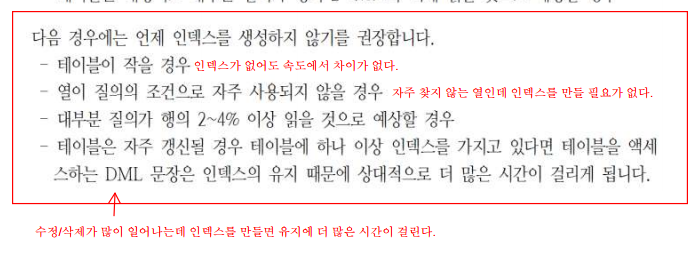
- index 는 primary key, unique 제약 조건에서 자동으로 생성되고, 조회를 빠르게 해주는 hint 역할을 한다.
- index종류로는 고유 / 비고유 인덱스가 있다.
- 유니크컬럼에는 unique 인덱스, 일반 컬럼에는 unique를 생략하고 지정할 수 있다.
- index는 조회를 빠르게 하지만, 무작위하게 많은 인덱스를 생성해서 사용하면 오히려, 성능 부하를 일이킬 수 있다. 그래서 최후의 수단으로 index를 사용하는 것이 올바른 사용방법이다.
🔸 테스트에 사용할 emps2 테이블 생성 (employees 테이블을 복사 한)
create table emps2 as (select * from employees);
select * from emps2;
1️⃣ 인덱스 생성

-- 인덱스 없을 때 full 스캔
select * from emps2 where first_name = 'Nancy'; -- f10눌러서 확인해보기

-- 인덱스 생성
create index firstname_idx on emps2(first_name);

-- 인덱스 생성 후 스캔
select * from emps2 where first_name = 'Nancy'; -- f10눌러서 확인해보기
인덱스를 생성후 테이블 창에서 인덱스 탭을 누르면 생성된 키를 볼 수 있다.

2️⃣ 인덱스 삭제(테이블에 영향을 미치지 않는다)
-- 인덱스 삭제(테이블에 영향을 미치지 않는다)
drop index firstname_idx;
3️⃣ 결합 인덱스 (컬럼 2개 이상)
create index emps2_name_idx
on emps2(first_name, last_name);

select * from emps2 where first_name = 'Nancy';
select * from emps2 where first_name = 'Nancy' and last_name = 'JJ';
🔸 오라클 한정 - select 시 index 조건 주기
-- full 스캔
select employee_id, salary from emps2;

-- index조건을 줘서 조회
select /*+ index(emps2 emps2_name_idx)*/
    employee_id, salary
from emps2;
위와 같이 select 옆에 /*+ */주석으로 index조건을 만들어서 달아줄 수 있다.

만약 salary를 기준으로 정렬해서 10-20 사이의 값을 뽑는다고 할때 아래와 같이 select 문을 3개나 사용해야 하지만
select *
from (select rownum as rn, a.*
        from (select * from emps2 order by salary desc)a
    )
where rn between 10 and 20;
index조건을 달아주면 2개로 줄일 수 있다.
select *
from (select /*+ index_desc(emps2 emps2_name_idx)*/
    rownum as rn, employee_id, salary
    from emps2
    order by first_name desc)
where rn between 10 and 20;
반응형
'국비지원 > DataBase' 카테고리의 다른 글
| [DB] 14. 데이터베이스 모델링 (0) | 2022.11.18 |
|---|---|
| [DB] 13. 권한 (Privilege) 사용자 생성 (0) | 2022.11.17 |
| [DB] 11. 뷰(View) (0) | 2022.11.16 |
| [DB] 10. 제약조건 (0) | 2022.11.16 |
| [DB] 9. 트랜잭션(Transaction) & 테이블 생성(CREATE TABLE) (0) | 2022.11.15 |


